How to Send GST Bills on WhatsApp with UPI QR (Free)
The ShopBill Pro Tools team builds free browser-based tools for Indian businesses, freelancers, and students. We write about finance, e-commerce, AI, and productivity — with practical, India-specific advice.
How to Send GST Bills on WhatsApp with UPI QR (Free)
I'm a hotelier. For years, I sent bills by hand. Guest checks out. I print a bill. They take the paper copy. Most of them lose it. Some ask for a photo. I take a photo of the paper bill with my phone and WhatsApp it to them.
That was my "system." A phone camera and a paper bill.
Then I realised something: my customers were already on WhatsApp. They weren't checking email. They weren't looking at PDFs. They were on WhatsApp all day. The same app they use to talk to their families was the app they'd use to receive their bill.
So I switched. GST bills on WhatsApp. A UPI QR built into the bill. Payment in one tap.
This guide covers how to send GST-compliant bills on WhatsApp with a UPI QR — and why this one change has been more effective than any other billing upgrade I've made.
Why WhatsApp Beats Email for Indian Bills
This isn't an opinion. It's how Indian customers actually behave.
| Channel | Open Rate | What Customers Do |
|---|---|---|
| 90%+ | Open immediately, save, share | |
| 20-30% | Open eventually, often go to spam | |
| SMS | 40-50% | Ignored, treated as spam |
| Paper bill | 100% | Lost, damaged, not digital |
The math: If you send 10 bills by email, 2-3 get opened. If you send 10 by WhatsApp, 9 get opened. That's not a small difference. That's a different business.
What a WhatsApp GST Bill Actually Looks Like
Here's what I send now — and what your customers would see.
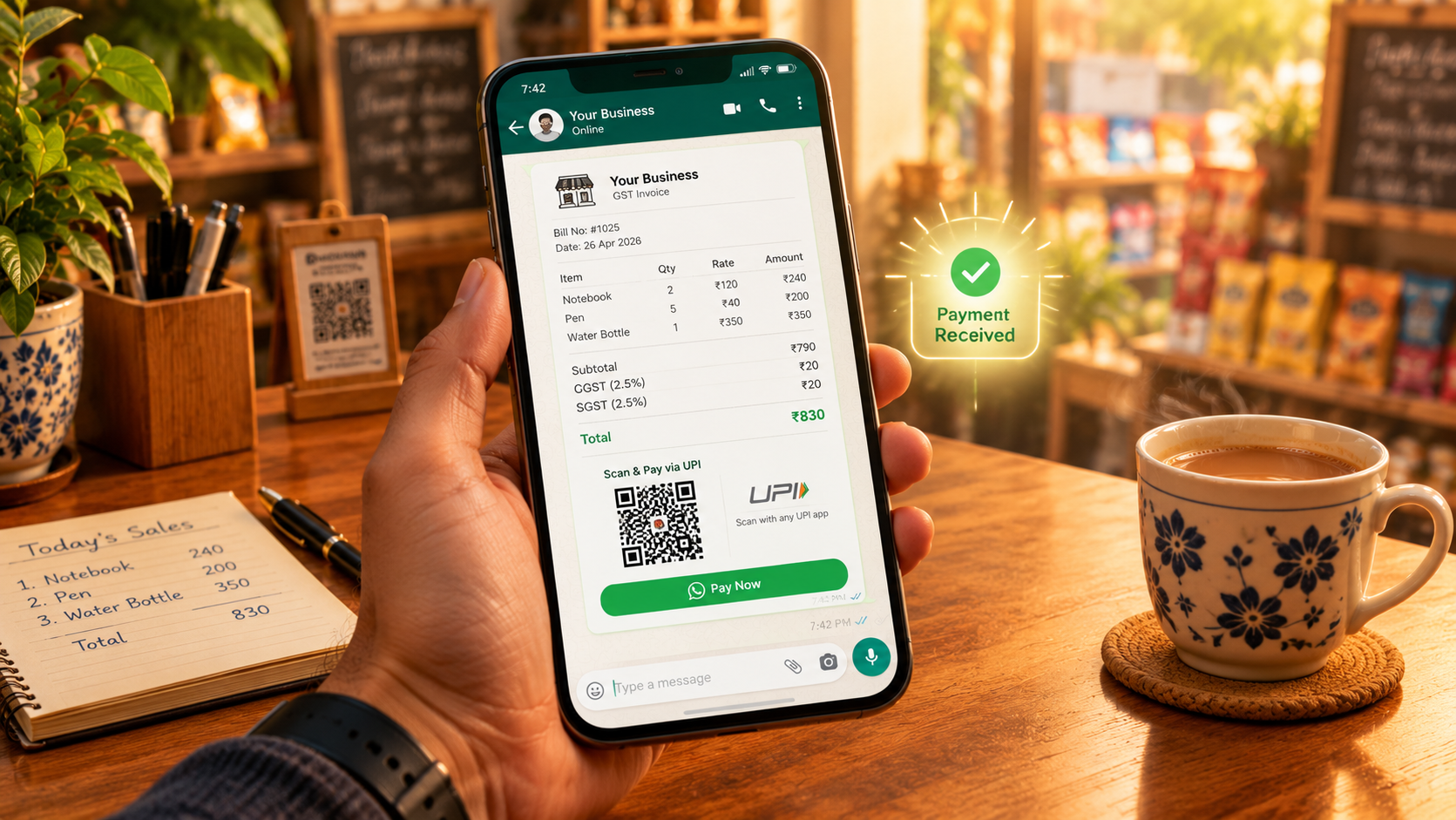
The message includes:
- Your business name and logo
- Guest/customer name
- Invoice number and date
- Items or services with GST breakdown (CGST + SGST or IGST)
- Total amount
- UPI QR code — scan to pay instantly
- Payment link (optional)
- Your contact details
What the customer does:
- Opens WhatsApp
- Sees the bill
- Scans the UPI QR with any payment app (GPay, PhonePe, Paytm)
- Money hits your account in seconds
- They save the bill for their records
Total time for you: under 30 seconds per bill.
How to Create a WhatsApp Bill (Step by Step)
There are two ways to do this. The free way and the fast way.
The Free Way (Manual)
- Create your GST invoice using our Invoice Generator
- Download the PDF
- Create a UPI QR using our QR Code Generator — embed it on the invoice
- Send the PDF on WhatsApp
Time: 2-3 minutes per bill. Cost: ₹0.
Best for: Freelancers and very small shops sending under 10 bills per day.
The Fast Way (Automated)
This is what I use now. ShopBill Pro has this built in.
- Create the bill in the app
- Tap "Send on WhatsApp"
- The bill opens in WhatsApp with the customer's number pre-filled
- The customer receives a formatted bill with a UPI QR embedded
- They scan and pay
Time: under 10 seconds per bill. Cost: Free plan (100 bills/month) or Pro (₹99/month for unlimited).
Best for: Any business sending more than a few bills a day.
The UPI QR: What It Is and Why It Matters
A UPI QR is a square barcode that opens a payment app with your UPI ID pre-filled. The customer scans it. The amount appears. They tap to pay.
Why it matters:
| Without UPI QR | With UPI QR |
|---|---|
| Customer asks "what's your UPI ID?" | Customer scans and pays |
| They type it wrong | No typing required |
| You wait for confirmation | Payment lands in seconds |
| Awkward back-and-forth | One tap, done |
For a hotel, this is the difference between a guest paying at the front desk and a guest paying from their room. For a shop, it's the difference between waiting for a bank transfer and getting paid instantly.
Use our QR Code Generator to create a free UPI QR code for your business. No signup needed.
Getting the GST Right on a WhatsApp Bill
A WhatsApp bill is only as good as the GST details on it. If the bill isn't GST-compliant, your customer can't claim input tax credit, and you're exposed during audits.
What must be on the bill:
| Field | Why It Matters |
|---|---|
| Your GSTIN | Identifies you as a registered seller |
| Customer GSTIN (B2B) | Required for the customer to claim ITC |
| Invoice number | Unique and sequential |
| Invoice date | When the bill was issued |
| Place of supply | Determines CGST+SGST vs IGST |
| HSN/SAC code | Classifies your goods or services |
| Taxable value | Amount before tax |
| CGST + SGST or IGST | The tax breakdown |
| Total amount | Including tax |
If any of these are missing, the bill is not fully GST-compliant. Your customer may still pay you, but they can't claim the tax credit — which makes them less likely to come back.
Use our GST Calculator to compute the correct CGST/SGST or IGST split before creating the bill.
Real Example: My Hotel's WhatsApp Billing
Here's exactly how it works now.
Before:
- Guest checks out
- I print a paper bill
- They take it or lose it
- If they want a copy, I take a photo and WhatsApp it manually
- Payment is cash or card at the desk
- Time per guest: 5-10 minutes
After:
- Guest checks out
- I create the bill in ShopBill Pro (30 seconds)
- Tap "Send on WhatsApp"
- Guest receives the bill with a UPI QR on their phone
- They scan and pay from anywhere
- They save the bill for their records
- Time per guest: under 1 minute
Result: Faster checkouts. Fewer payment disputes. No paper. And guests can pay from their room — which means I don't need to keep cash on hand at reception late at night.
Common Mistakes to Avoid
1. Sending bills without GST breakdown.
A bill with just "Total: ₹1,180" is not a GST bill. Your customer can't claim ITC. Show CGST and SGST separately (or IGST).
2. Using an unclear UPI QR.
Test the QR before sending it to a customer. Open it on your own phone and confirm it opens the right UPI ID with the right amount. A broken QR is worse than no QR.
3. Sending the wrong bill to the wrong customer.
WhatsApp has no "unsend" after the customer has read it. Double-check the contact before tapping send.
4. Not keeping a copy.
You must retain invoice records for 8 years under GST rules. Save every bill you send. ShopBill Pro does this automatically.
5. Using a bill that isn't GST-compliant.
If a bill lacks GSTIN, invoice number, place of supply, or HSN code, it's not a valid GST invoice. Use a template or a tool that handles this.
How ShopBill Pro Makes This Effortless
This is exactly why I built ShopBill Pro. I wanted:
- GST bills on WhatsApp with one tap
- UPI QR embedded in the bill
- No manual formatting
- No separate tools to juggle
- Works on my phone
ShopBill Pro does all of this. The free plan includes 100 bills per month. Pro (₹99/month) gives you unlimited bills, no watermark, and full GSTR reports.
The comparison:
| Task | Manual | ShopBill Pro |
|---|---|---|
| Create GST bill | Word template | Automatic |
| CGST/SGST split | Manual calculation | Automatic |
| UPI QR | Separate tool | Built-in |
| Send on WhatsApp | Download + attach | One tap |
| Record keeping | Manual folder | Automatic |
If you're sending more than 5 bills a day, the Pro plan pays for itself in the time it saves.
Frequently Asked Questions
Is sending bills on WhatsApp legal?
Yes. A GST invoice sent via WhatsApp is valid as long as it contains all mandatory fields. The medium of delivery doesn't matter.
Can I add a UPI QR to any invoice?
Yes. Generate a UPI QR from our QR Code Generator and place it on the invoice before downloading.
Do customers prefer WhatsApp over email?
Overwhelmingly, yes. In India, WhatsApp open rates are far higher than email. Most customers will see the bill within minutes.
Is this free?
The manual method (using our free tools) is completely free. The automated method is free for up to 100 bills per month on ShopBill Pro's Free plan.
What if the customer doesn't have UPI?
Include a bank transfer option in the bill with account number and IFSC. Most customers will have UPI, but not all.
Can I send the same bill to multiple people?
Yes, but keep a copy for your records. And make sure you're not sending one customer's bill to another.
Does WhatsApp have a file size limit?
Yes, but a standard PDF bill is well under it. Compress the PDF if needed using our PDF Compressor .
The Bottom Line
I'm a hotelier. My customers live on WhatsApp. Sending bills any other way was fighting how they actually behave.
The change was simple: GST bills on WhatsApp, with a UPI QR built in. Payment in seconds. Record-keeping automatic. Customers happy.
If you're still printing paper bills or sending PDFs by email, try WhatsApp. It's where your customers already are.
Try Our Free Tools
Everything you need for WhatsApp billing — free, no signup:
- Invoice Generator — GST bills in seconds
- QR Code Generator — UPI QR for payments
- GST Calculator — CGST, SGST, IGST splits
- PDF Compressor — Reduce bill size for WhatsApp
- ShopBill Pro — One-tap WhatsApp billing (Free plan)
All tools work in your browser — no signup, no upload.
Written by Vinay. I run a hotel, built ShopBill Pro for my own business, and now help other small businesses do the same. This article is based on my real experience — not theory.
Need free tools while you read?
120+ free tools for Indian businesses - no signup required.
Related articles

How Much Emergency Fund Do You Actually Need in 2026? (The 6-Month Rule)
If your monthly expenses are ₹30,000, you need an emergency fund of ₹1.8 Lakh. Here is the exact math, where to park the money, and how to build it fast.

How to Calculate Trip Fuel Cost for Your Next Road Trip in India (2026)
Planning a road trip? A 600km trip from Mumbai to Goa can cost ₹4,500 in fuel alone. Here is the exact formula to calculate your fuel and toll costs before you leave.
ChatGPT Wallet: How AI Agents Spending Money Will Change Small Business
OpenAI just gave AI agents the ability to make purchases. Here is how the new ChatGPT Wallet works, the security risks, and what it means for your business billing.